
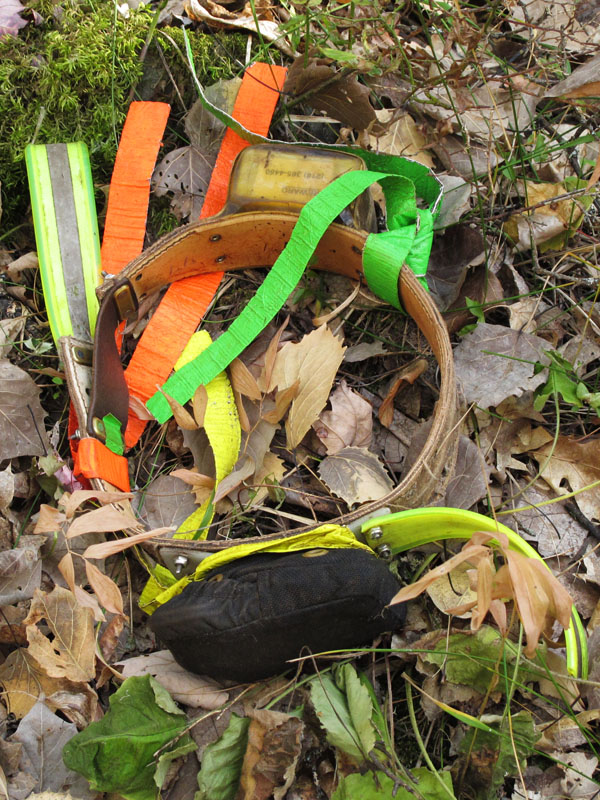
Braveheart has dropped her collar now, too. It’s our fault. We thought we should loosen the collar an inch. Wrong. In a forest opening where the smashed vegetation looked like the scene of a play session, the collar came off. It reminds us of Hope taking Lily’s collar off last winter in a play session. So now both Braveheart and Donna are without collars and keeping us on edge until they show and can get their collars and ribbons back on.
Lily and family are fine. They headed down into a hunting area in the nether regions of their territory. The big worry, of course, is for Hope without a collar, but the hunters there texted us that they were done hunting and Lily’s family is welcome to any bait left. Hope has had a collar on 4 times this summer, but the record retention time is only a little over 4 hours. She is getting warier and warier of anyone carrying a collar.
It is no wonder Glenn couldn’t get a radio signal on Colleen earlier this year. Now that we are getting GPS locations for her we see that she is usually more than a mile from any roads. Depending on terrain, that’s stretching the range of telemetry signals unless we’re up in an airplane. She now lives about 9 miles from where she was born. To find a territory, she moved far enough from the center of the clan that she is no longer adjacent to her kin. We got an indication of that when we learned that between Colleen’s territory and the rest of her clan a hunter killed a mother of three cubs that we have never seen. One of the cubs is brown. We hadn’t heard of any litters like that.
You are finding helpful information on the oldest bears of each species. Links to where you found the info would help, too. If any of the information comes from printed sources, the references would be nice to cite. We’re going to end up with an exhibit out of this. The number of people submitting information is still manageable, so the credit might read, “Compiled by Lily fans xxx, xxx, xxx, … xxx, and xxx.”
 Realizing there is some confusion over how to use the DVD set “Lily and Hope: Memories of 2010” we chose to provide an overview. On our PC, when we load the DVD, a screen comes up with options for opening it. Choose “Open folder to view files using Windows Explorer” and click on it. Up comes a screen with 6 folders—Documents, Sounds, Videos, 2010 Research Updates.pdf, Please read me first.pdf, and Auto run.inf. Click on 2010 Research Updates.pdf. Everything is nicely arranged. Scroll down to the Table of Contents that lists all the updates by date and name. Click on any listing to go right to it. Within the update, click on any words highlighted in yellow to go immediately to a video or document without having to go through the Internet. On our computer, a warning popped up asking if we trust the source. Of course we trust the source because it is our own DVD. We clicked on “Always trust this source.”
The first three folders we mentioned (Documents, Sounds, and Videos) are there mainly for reference. That’s where the Research Updates in the 2010 Research Updates.pdf folder grab the videos or sounds, etc., to play. We had fun watching the 92 color videos one after another. They cover the whole year from January 8 through December 31. Those are the color videos we took in the field or at the den. Three of the 92 videos are the highlights videos we assembled to play on the big screen in the North American Bear Center. These were the first videos people saw when they came in the door. It was moving to see little Hope so cute and remember all that was happening during that roller coaster year. These color videos looked good full screen.
The Sounds folder makes it easy to click on the individual files and hear the sounds one after another.
Of the two remaining folders on that DVD, one says “Please read me first.pdf” but it’s the same as the words on the inside cover of the DVD set, so you can skip that one. The other folder is an inconsequential file labeled Auto run.inf that has to be in there but we don’t know what for. Skip that one, too.
The other two DVD’s in the set contain the 95 videos Linda Gibson put together through 2010—51 on the first DVD and 44 on the second. The last 4 are highlights videos that play at the NABC in the Lily and Hope exhibit. What makes these DVD’s nice is you can click on any of the 95 videos and they will play continuously in sequence if you want. If you want to see a scene again, it is easy to go back and even play it in slow motion. To do that, click pause and then click it forward in slow motion or frame by frame. On our computer, the default player is Windows Media Player. You might have your computer set to a different default player that might do other things. On our computer, we watched these black and white videos in full screen mode and they weren’t bad.
The reason we looked at the DVD’s in the first place was to do a word search on all the updates. By entering the search word “reunited,” we saw every mention of Lily and Hope reuniting. As we try to remember what happened, entering any search word takes us right to it.
The 3-DVD collector’s set “Lily and Hope: Memories of 2010” is available through the NABC Gift Shop at http://www.bear.org/website/gift-shop.html?page=shop.product_details&flypage=flypage_images.tpl&product_id=855.
Tonight, the volunteers came back to a good meal of fried chicken, mashed potatoes, gravy, and rolls thanks to another Lily fan. For dessert, there were the pies, cookies, creme-filled cookies, sweet rolls, fudge, and bars you sent! We hope we are exercising enough to handle what we can’t resist. Thank you so much!
Thank you for all you do.
Lynn Rogers and Sue Mansfield, Biologists, Wildlife Research Institute and North American Bear Center